Your Event System, Fully Controlled by Your Admin Team.
We eliminated the “unprofitable activity” of developer dependency. It’s not a “static” list of posts; it’s a dynamic, rules-based event system where admins have 100% control over the data, the logic, and the design—all from the familiar editor.
The 80/20 Question: Why Are Events So Hard to Manage?
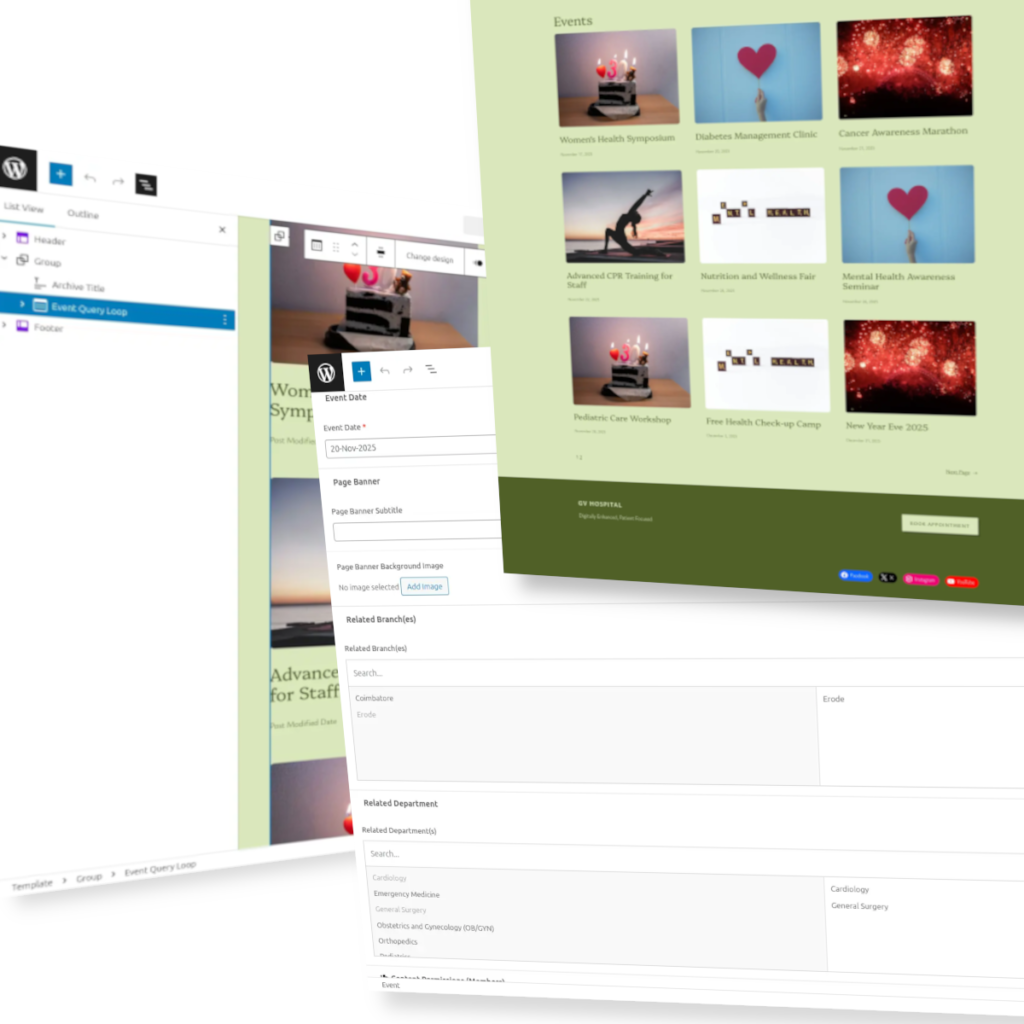
Your event list is a critical, time-sensitive asset. But it’s often trapped by “unprofitable” developer-locked logic.
- Static Logic: Old events don’t automatically hide. Changing a date doesn’t re-sort the list. This isn’t just “unprofitable”; it’s misinformation that creates a confusing “patient journey.”
- Data Chaos: Key information—like which branch an event belongs to—is just static text, not a “profitable” relational link.
- Design Bottlenecks: The “look” of your event (the date format, the style of the links) is hard-coded in a template, “eliminating” your ability to match it to your brand without a new developer ticket.
- Developer Dependency: The “unprofitable activity” of waiting for a developer to make a 5-minute text or style change that your team should be able to do instantly.
Our 80/20 Focus: We eliminate the “unprofitable” developer tickets, so your admin team can focus on the 80/20 work: keeping event information 100% accurate and visually engaging, in real-time.
The Journey from Chaos to Control
Part 1: Focus on the Collection (The Archive Page)
First, we give you “profitable” control over the logic of the event list itself.
Focus on Intelligent Logic (Archive Change Date)
The Challenge: An event archive’s order is crucial. If an event’s date is changed (e.g., a typo is fixed, or it’s rescheduled), it should automatically move to the correct place in the list. Manually re-ordering is time-consuming, error-prone, and frustrating.
The Solution (The Demo): This demo shows how the system intelligently re-sorts the Event Archive instantly based on the event’s date. By simply editing the event’s date and saving, the archive page automatically updates, placing the event in its new, correct chronological position. No manual sorting, no developer tickets.
Focus on Global Design (Archive Event Date Format)
The Challenge: You want your event archive dates to look a certain way (e.g., “Oct 04, 2024” vs. “October 4”). This is often a “hard-coded” setting, forcing you to file a developer ticket for a simple visual change, which wastes time and money.
The Solution (The Demo): This demo shows you have complete, instant control over how dates are displayed on your event archive. Using the site’s visual editor, you can select the exact date block and choose from a list of formats—no code required.
Focus on Filtering Rules (Archive Event Old Post)
The Challenge: By default, an event archive should cleanly show “Upcoming Events” to users. But what about admins? You need a simple way to see all events, including past ones, for management and auditing, without this “upcoming” filter getting in the way.
The Solution (The Demo): This demo shows a simple, powerful toggle in the site’s visual editor. With one click, you can disable the “Filter by upcoming date,” instantly revealing all past and future events on the archive page.
Part 2: Focus on the Individual (The Single Event Page)
Next, we give you “focused” control over the data and design of each individual event.
Focus on Core Data (Update Event Date)
The Challenge: An event’s date is its most critical piece of information. If a date needs to be corrected or rescheduled, you shouldn’t have to hunt through complex settings or ask a developer. You need to be able to change it right on the event post itself.
The Solution (The Demo): This demo shows how a simple, clear “Event Date” calendar is added directly to the event’s editing screen. This empowers any admin to change an event’s date in seconds. The change is then instantly reflected on the live site, ensuring patients always see the correct information.
Focus on Data Relationships (Update Event Branch)
The Challenge: An event might be relevant to one, or many, of your hospital branches. You need a simple way to tag an event to its relevant locations (e.g., “Erode,” “Coimbatore”) right from the event post, without needing a developer to make the connection.
The Solution (The Demo): This demo shows a simple, intuitive “Related Branch(es)” checklist right on the event editing screen. You can add or remove branch connections with a single click. These changes are instantly updated on the live event page, showing visitors exactly which locations are relevant.
Focus on “In-the-Moment” Design (Event Date Format & Style)
The Challenge: Your event date is displayed, but it looks generic. What if you want to change its format (e.g., “Nov 17” vs. “November 17, 2025”) or its style (color, font size) to match your brand? This is typically a “hard-coded” setting that requires a developer to change.
The Solution (The Demo): This demo shows you have total visual control. From the “Edit Site” screen, you can select the date block, instantly change its format from a simple toggle, and then use the “Styles” tab to customize its color, font, and borders—just like any other text block.
Focus on Functional Design (Event Branch Format & Style)
The Challenge: The related branch names on your event page are just plain text links. What if you want to make them stand out as buttons? Or change their color, font, or style? Or what if you don’t want them to be links at all? These are usually hard-coded settings requiring a developer.
The Solution (The Demo): This demo shows you have complete visual and functional control over the event’s branch links. From the “Edit Site” screen, you can select the “Event Branches” block, toggle its link functionality on or off, and then use the “Styles” tab to customize its entire appearance (color, font, borders) just like any other block.
Focus on Control, Not Chaos.
This isn’t just an “events post type.” It’s a complete, “intelligent” management system built on 80/20 principles.
- Data Control: You control the data. Dates, branches, and content are “simplified” into clear fields, not hidden in code.
- Logic Control: You control the rules. “Focus” your list on upcoming events or show all. The system’s logic is your logic.
- Design Control: You control the visuals. Change formats, colors, fonts, and styles instantly from the editor. This is true “leverage,” “eliminating” the design bottleneck.
- Efficiency & Focus: You eliminate developer dependency. This “simplification” frees your team from “unprofitable” waiting, letting them “focus” on the 80/20 work: creating and promoting events.
Ready to Move from “Static Posts” to “Dynamic Control”?
This event system gives your patients 24/2 access to accurate, well-designed information. But the real 80/20 “leverage” is the Admin Control Panel that gives your staff full data and design control.